

Content provenance with Lambda@Edge on CloudFront Sign every article at the edge.
A Lambda@Edge function adds a signed label to every article as your CDNCDN: Content delivery network: servers around the world that keep copies of a site close to readers so pages load fast. serves it. The label shows who published the text and whether it changed. Signing is free for publishers.
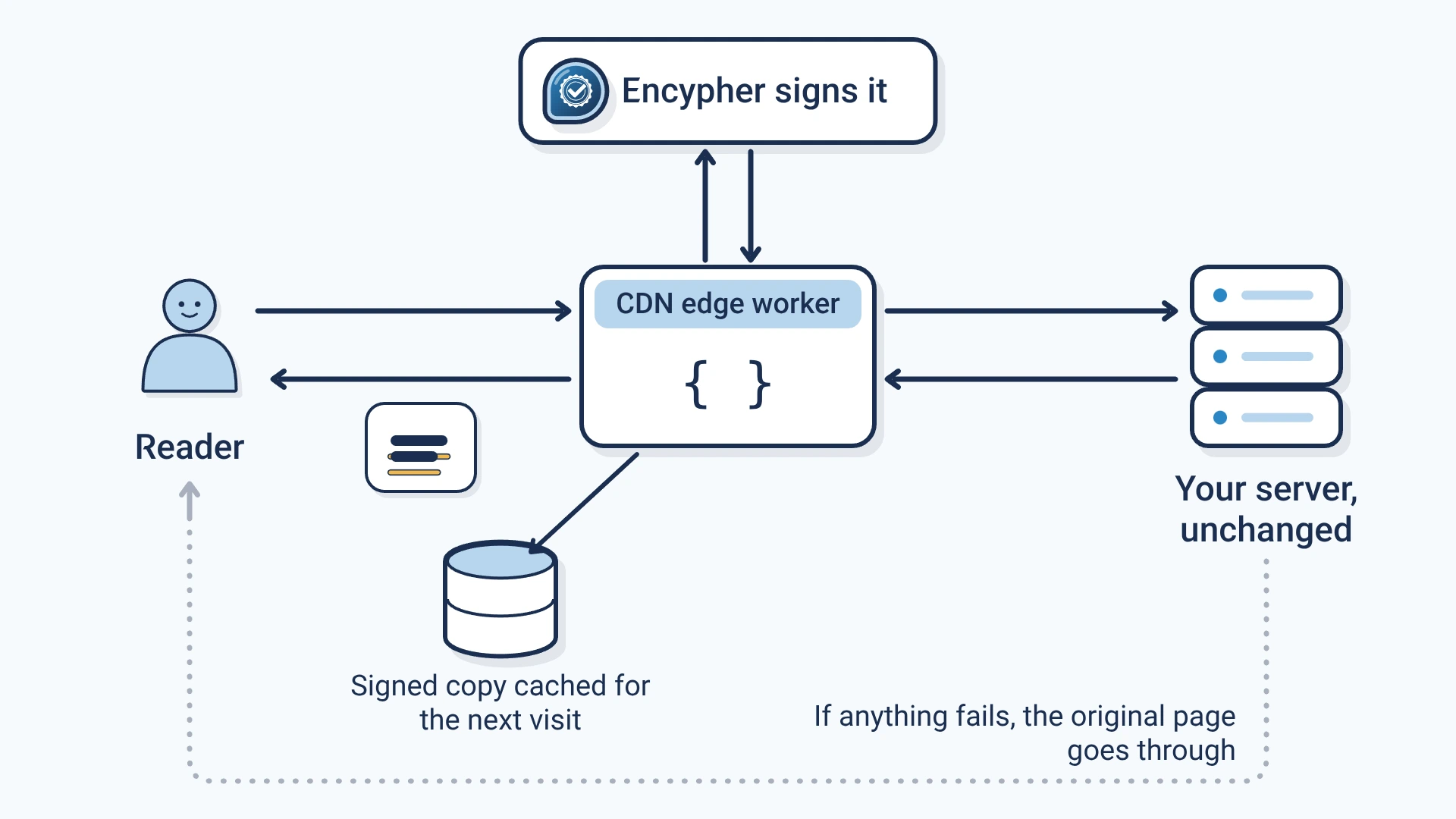
- A label in every article
- Each article gets content provenanceContent provenance: The record of where a piece of content came from and how it changed, carried with the content itself.: a C2PA manifestC2PA manifest: The signed label itself: a small package inside a file that records who signed it, what they declared and how to check it. and invisible provenance markersProvenance markers: Encypher's general name for invisible characters that carry a signed label inside text. in its text, sentence by sentence.
- Nothing changes at origin
- The edge functionEdge function: A small program that runs on a CDN's servers and can change a page as it passes through to the reader. sits between readers and your origin serverOrigin server: The server where your site's pages are built and stored before a CDN delivers them.. It finds the article on WordPress, Ghost, Substack, Webflow, Hugo and custom HTML.
- Never blocks a page
- It is fail-openFail open: If signing is down, the page is served unsigned instead of failing, so readers never see an error.: if signing fails for any reason, readers get your original page.
- Fast repeat visits
- Signed results are cached in a DynamoDB table in your account. The first visitor is not kept waiting: signing runs in the background.
Set it up
Claim your domain
Create a free account and claim your domain. You get a worker credentialWorker credential: A secret key, tied to one verified domain, that lets an Encypher edge worker ask for signatures., a secret key tied to that domain.
Create a free accountBuild with your credential
Store the credential in SSM Parameter Store and build the function with its name.
Deploy and attach
Deploy the CloudFormation stack, publish a version, and attach it to your distribution on origin request.
Check the label
Open an article and look for the header X-Encypher-Provenance: active. Then paste a paragraph into the free checker.
Open the free checker
Copied text keeps the label
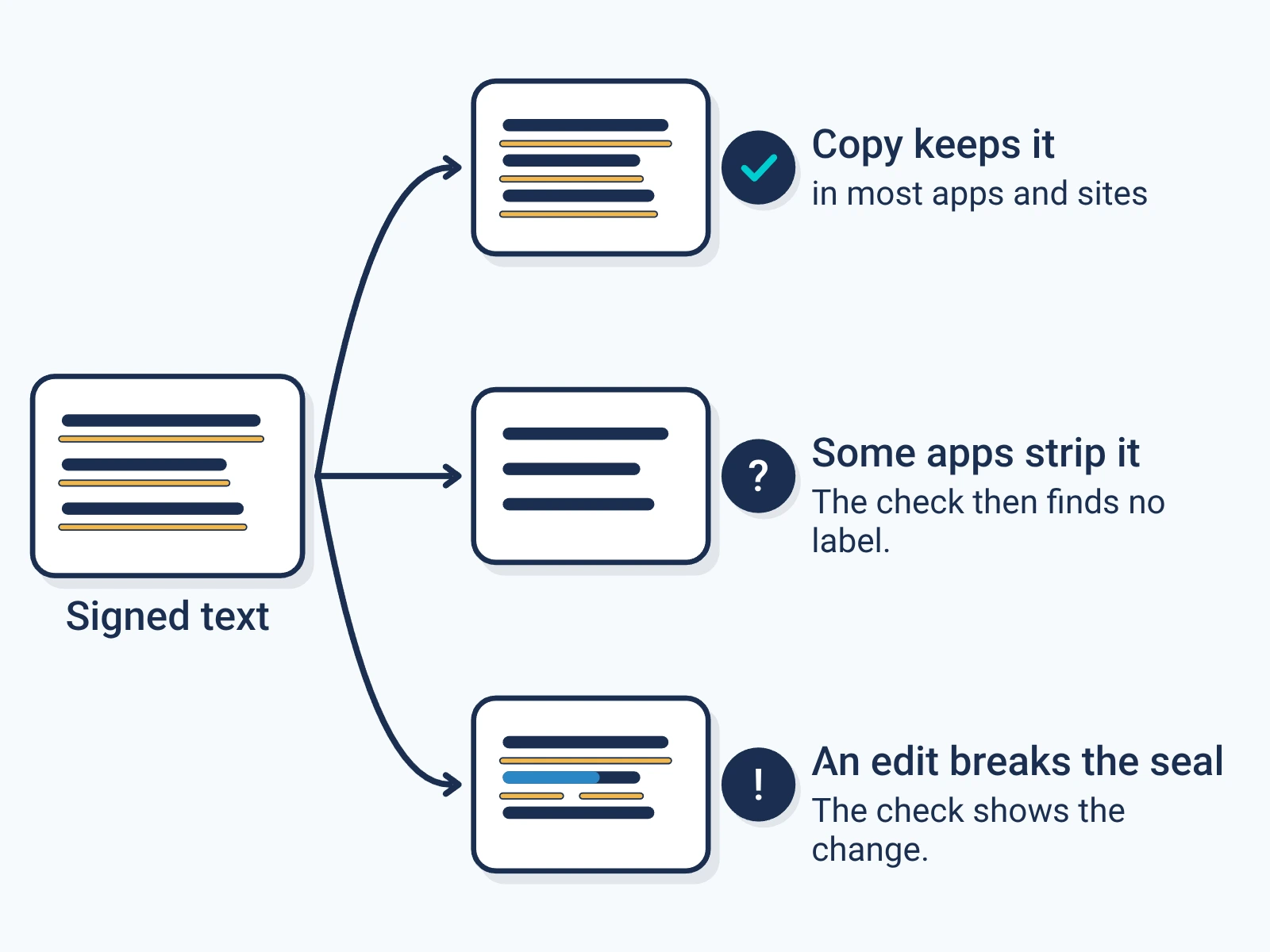
The markers sit between the letters, so they travel when a reader copies a paragraph into a document, a post or an AI prompt.
Some apps strip them. Any edit to the words shows up when the text is checked.
Check a paragraphFor engineers
Show the technical detail
aws ssm put-parameter --name /encypher/edge/worker-token \
  --value <your worker credential> --type SecureString --region us-east-1

SSM_WORKER_TOKEN_PARAM=/encypher/edge/worker-token npm run build
aws cloudformation deploy --template-file template.yaml \
--stack-name encypher-edge-provenance --region us-east-1 \
--capabilities CAPABILITY_NAMED_IAM
# Create the function in us-east-1 (Node.js 22.x, handler.handler,
# the stack's ExecutionRoleArn), upload function.zip, then:
aws lambda publish-version --function-name encypher-edge-provenance --region us-east-1CloudFront > your distribution > Behaviors > edit
Function associations
Origin request: Lambda@Edge
Function ARN: arn:aws:lambda:us-east-1:<account>:function:encypher-edge-provenance:<version><!-- Page-level terms, embedded in the C2PA manifest -->
<meta name="encypher-rights" content="All rights reserved.">
<meta name="encypher-license" content="CC-BY-4.0">
<!-- Block-level terms, mapped to the sentences inside -->
<div data-encypher-rights="(c) 2026 Your Publication"
data-encypher-license="CC-BY-4.0">
<p>Your original reporting.</p>
</div># Signed pages carry this header
curl -sI https://yourdomain.com/your-article | grep -i x-encypher
# X-Encypher-Provenance: active
# Domain status: your domain token and org ID
curl -s https://yourdomain.com/.well-known/encypher-verify- Article detection
- Eight checks in order: your selector override, the <article> tag, common CMS classes, Schema.org articleBody, <main>, JSON-LD, the densest paragraph cluster, then <body>.
- What is sent
- Only the visible article text, up to 51,200 characters by default. The API returns an embedding plan, and the worker writes the markers into the HTML at those positions.
- Status header
- X-Encypher-Provenance is active on a signed page, or skipped:oversized, skipped:empty or skipped:error when the page passes through unchanged.
- Rights
- Block attributes win over page meta tags, and page tags win over the rights profile in your dashboard. Rights are embedded only on requests that carry the worker credential.
- Async signing
- By default the first visit to an unsigned article is served at once with X-Encypher-Provenance: pending, and the next visit is signed. Build with ASYNC_SIGNING=false to sign inline.
- Configuration
- Lambda@Edge has no runtime environment variables, so settings are fixed at build time. SSM lets the credential rotate without a redeploy. Pages can also set <meta name="encypher-selector">.
- What the stack creates
- A pay-per-request DynamoDB cache table and a least-privilege IAM execution role, both in your account. Metrics go to CloudWatch in Embedded Metric Format.