C2PA Compliant

Protect Your WordPress Content with Cryptographic Proof

Embed invisible digital signatures that prove when your content was created, by whom, and whether it's been tampered with. Fight misinformation, plagiarism, and content theft.

Built on C2PA standards developed with industry leaders

GoogleBBCAdobeMicrosoftOpenAINew York TimesAssociated Press

Everything You Need to Protect Your Content

Encypher Provenance integrates seamlessly with WordPress to provide enterprise-grade content authentication without changing your workflow.

C2PA Compliant
Built on the same standards used by Google, BBC, Adobe, Microsoft, and OpenAI.
Auto-Sign on Publish
Content is automatically signed when you publish or update posts.
Tamper Detection
Cryptographic signatures detect if content has been modified after signing.
Sentence-Level Attribution
Track provenance at the sentence level for quote verification (available with Enterprise and select add-ons).
Coalition Membership
Join the Encypher Coalition for content licensing revenue sharing.
Analytics Dashboard
Track signing coverage, verification hits, and content protection status.

How It Works

Three steps to protect your WordPress content. No external account setup required.

1

Install the Plugin

Upload the plugin to your WordPress site and activate it from the Plugins page.

2

Activate with One Click

Accept the terms of service and click Activate. The plugin provisions your account and connects automatically.

3

Publish and Verify

Content is signed automatically on publish. A verification badge lets readers confirm authenticity.

Three Ways to Connect

New users activate in one click. Existing Encypher users can connect their account directly.

Recommended
One-Click Activation
The fastest path. Check the terms of service box and click Activate Provenance. The plugin creates your free account using your WordPress admin email and connects immediately.
  • No separate sign-up
  • Automatic provisioning
  • Ready to publish in seconds
Download Plugin
Connect Existing Account
Already have an Encypher account? Click "Connect with Encypher account" on the activation card. You will be redirected to log in and authorize your WordPress site.
  • Links to existing organization
  • Preserves tier and settings
  • OAuth, secure authorization
Manual API Key
Paste an API key from the Encypher dashboard directly into the plugin settings. Useful for teams that manage keys centrally or run multiple sites.
  • Full control over key lifecycle
  • Multi-site management
  • Works with any Encypher plan

See It in Your WordPress

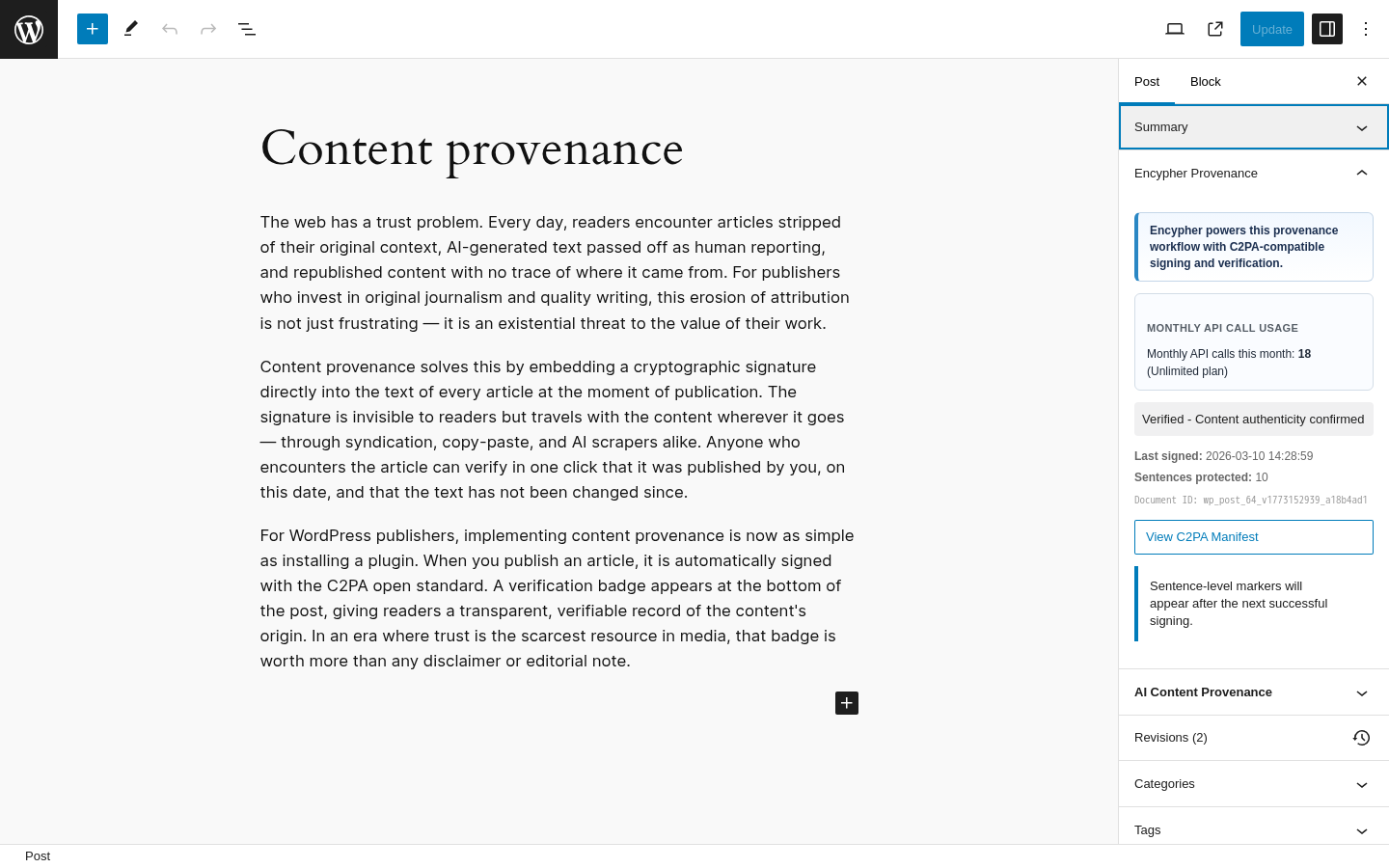
Your readers see a verification badge. Your editors see provenance status in the block editor. You control everything from the settings page.

WordPress block editor showing Encypher provenance sidebar with signing status, API call usage, and C2PA manifest link

Block editor integration

The Encypher Provenance sidebar shows signing status, API usage, and a link to the C2PA manifest for each post.

Published WordPress post with Encypher verification badge at the bottom confirming content authenticity

Reader verification badge

A verification badge appears at the bottom of each signed post. Readers click it to confirm the content is authentic.

WordPress admin settings page for Encypher plugin showing signature management, C2PA settings, and auto-mark options

Plugin settings

Configure signature mode, auto-sign on publish, C2PA manifest format, and which post types to protect.

Simple, Transparent Pricing

Choose between Free and Enterprise plans. Add-ons are available for teams with specific needs.

Most Popular
Free
Free
For bloggers and teams getting started with verifiable publishing
  • Auto-sign on publish/update
  • Document-level C2PA manifests
  • Public verification badge
  • Coalition membership
  • 100 posts per bulk operation
Get Started Free
Enterprise
Custom
For publishers that need custom controls, support, and deployment options
  • Everything in Free
  • Sentence-level attribution
  • Merkle tree encoding
  • BYOK (Bring Your Own Key)
  • Custom branding (white-label)
  • SSO integration
  • Dedicated account manager
  • Coalition membership included
  • SLA guarantee
  • On-premise deployment option
Contact Sales
Add-ons
Optional enhancements available on top of Free or Enterprise plans.
  • Whitelabel verification pages
  • Expanded bulk signing throughput
  • Priority onboarding support

Who Uses Encypher Provenance?

News Publishers

Prove article authenticity and combat misinformation with verifiable provenance.

Bloggers

Protect original content from plagiarism and prove you published first.

Legal & Finance

Create tamper-evident records for compliance and audit trails.

AI Companies

Respect content licensing through Coalition membership and rights metadata.

Ready to Protect Your Content?

Install the plugin, click Activate, and publish signed content. No external sign-up required. Free tier included.

Frequently Asked Questions

What is C2PA?

C2PA (Coalition for Content Provenance and Authenticity) is an open standard for content authentication developed by Adobe, Microsoft, Google, BBC, and others. It provides a way to cryptographically sign content to prove its origin and detect tampering.

Are the signatures visible?

No. C2PA manifests are embedded using invisible encoding. They don't affect how your content looks but can be extracted for verification.

Does this work with Gutenberg and Classic Editor?

Yes! The plugin supports both the block editor (Gutenberg) with a dedicated sidebar panel, and the Classic Editor with a meta box.

What happens when I edit a signed post?

The plugin automatically re-signs the content with a "c2pa.edited" action and maintains a provenance chain linking to the previous version, creating a complete edit history.

Is my content sent to external servers?

Content is sent to Encypher's API for signing. We create cryptographic signatures but do not store your full content. See our privacy policy for details.